Introduction to HTML
Learn the language behind every webpage
Learning Objectives
- Understand what HTML is and its role in creating webpages
- Identify the structure and building blocks of an HTML document
- Use basic HTML tags to create elements, links, and display images
- Explore safe practices for using and attributing images online
What is HTML?
In the previous section, you learned about webpages and websites. Now, we introduce you to HTML – HyperText Markup Language, the foundational language used to create those webpages. HTML allows us to define the structure and content of a webpage using a variety of elements and tags.
Getting Ready
Before you dive in, make sure you have access to a computer (preferably not a smartphone or tablet). HTML is best written and tested on a desktop or laptop, either Windows or Mac. You don't need any fancy software — simple tools like Notepad (Windows) or TextEdit (Mac) are sufficient.
If you're curious about more advanced tools, you can download Visual Studio Code (VS Code), a powerful and free editor that works on all platforms.
HTML Structure, Elements, and Links
HTML is made up of elements that define headings, paragraphs, links, images, and more. To understand this better, view the PowerPoint presentation embedded below which explains:
- The standard structure of an HTML document
- Common elements and tags used
- How to create hyperlinks
Go through the PowerPoint presentation to learn more
Note: For optimal compatibility, especially with embedded PowerPoint presentations, please use the latest version of Edge, Chrome, or Safari browsers. Firefox may not display these elements correctly.
HTML Boilerplate
To help you get started with writing HTML, watch the interactive Edpuzzle video below. It introduces the standard boilerplate structure of an HTML document and includes guided questions and explanations.
If the interactive Edpuzzle video fails to open, please access it throught this Edpuzzle interactive video link
Adding Images in HTML
Images make your web content more engaging and visually appealing. In HTML, images are added using the <img> tag. However, it's important to use only properly licensed or public domain images. Avoid using pirated or copyrighted content.
You can find free images from sources like Unsplash or search Google Images using Creative Commons filters. The image below shows how to do that using Google’s tools.
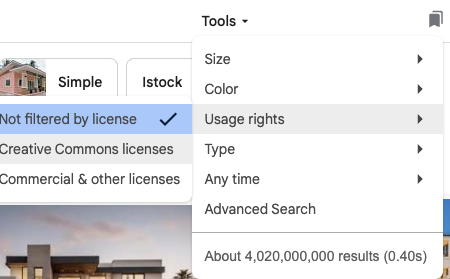
Watch the Youtube video to learn about HTML images.
HTML Validation
HTML validation is the process of checking your code for errors and ensuring that it follows official web standards. Valid HTML ensures that your webpages are displayed consistently across different browsers and devices, and that they remain accessible.
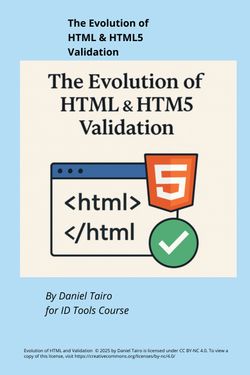
We’ve provided an eBook that explores the history of HTML and the importance of validating your code, especially when working with HTML5.
Try It Yourself: Activity
Create a simple HTML page that includes:
- A heading with your name
- A short paragraph about yourself
- An image of your choice (use Unsplash or Google with usage rights)
- A link to your favorite website
Save your file as index.html and open it in your browser to test it.
Quick Multiple Choices quiz! (Since this presentation is embedded, you must answer all questions correctly to proceed to the next one. If you get any question wrong, you will need to restart the activity from the beginning.)
Note: For optimal compatibility, especially with embedded PowerPoint presentations, please use the latest version of Edge, Chrome, or Safari browsers. Firefox may not display these elements correctly.
Further Reading
- W3Schools. (2024). HTML Tutorial. Retrieved from https://www.w3schools.com/html/
- Mozilla Developer Network. (2024). HTML Basics. Retrieved from https://developer.mozilla.org/en-US/docs/Web/HTML
- Freeman, E., & Robson, E. (2022). Head First HTML and CSS. O’Reilly Media.
References
- Mozilla Developer Network. (2024). HTML Basics. Retrieved July 2025, from https://developer.mozilla.org
- W3Schools. (2024). HTML Tutorial. Retrieved July 2025, from https://www.w3schools.com
- Freeman, E., & Robson, E. (2022). Head First HTML and CSS. O’Reilly Media.